
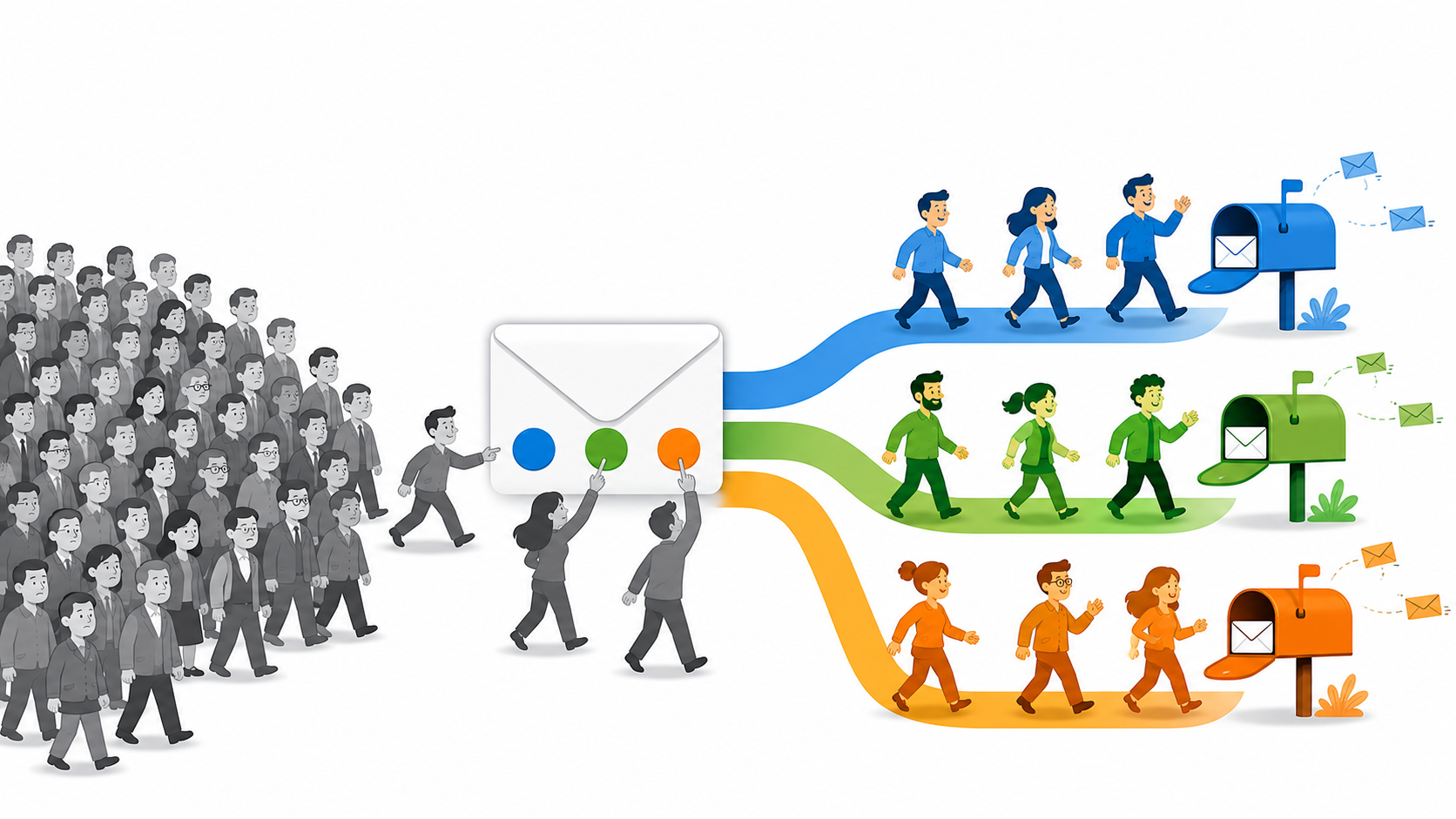

Introduction: Why Most Lead Lists Are One Undifferentiated Blob
Take an honest look at your lead list. If you’re like most B2B marketers, it’s one big bucket. Everyone who ever downloaded a guide, attended a webinar, or filled out a contact form sits in the same list, and everyone gets the same emails.
Then the monthly newsletter goes out to all of them, open rates hover in the low twenties, clicks barely register, and somebody in a meeting asks why email “isn’t working.”
The 93% Problem
Email isn’t the problem. The blob is the problem. Back in 2012, Marketing Sherpa found that 79% of marketing leads never convert into sales, and named lack of nurturing as the most common cause.
More than a decade later, the picture hasn’t improved. It’s gotten worse. Current full-funnel benchmark data (First Page Sage, 2025) puts average MQL-to-close rates for B2B companies between 1% and 7%, which means 93% or more of the leads marketing generates today never become customers. The single biggest reason hasn’t changed: a lack of relevant, sustained follow-up.
When every lead gets the same message regardless of what they care about, you’re not nurturing anyone. You’re broadcasting at everyone and hoping something sticks. We’ve written before that push and hope is not an email strategy, and unsegmented sending is push and hope in its purest form.
Lead segmentation is how you break up the blob. Done right, it isn’t a painful list-management project. It’s something your marketing automation platform does for you, in real time, based on what your leads actually do. And if you’ve ever wondered whether segmentation is worth the effort at all, it’s worth confronting that skepticism head-on first: read our take in Don’t Bother with Lead Segmentation.
What Is Lead Segmentation?
Lead segmentation is the practice of dividing your leads into distinct groups based on what they do, what they’ve downloaded, or where they are in the buyer journey, so that every follow-up email or nurture sequence is relevant rather than generic.
Most B2B teams segment by job title or company size and wonder why results stagnate. The marketers who convert more leads segment by demonstrated behavior: the links clicked, the content downloaded, the pages visited. Done right inside a marketing automation platform, segmentation happens automatically, and every lead gets a follow-up that feels personally written for them.
That last part matters. Segmentation is not a one-time setup task you complete in your CRM and revisit next quarter. It’s a continuous signal loop. Every email click, form submission, and content download is a lead telling you what they’re interested in right now. Your job is to build the system that listens.
Why Lead Segmentation Matters for B2B Marketing
Why does lead segmentation matter so much for B2B marketing? Because relevance is what converts. Properly segmented email programs can reach open rates in the 50 to 60% range with clickthrough rates above 20%, while unsegmented programs typically sit near industry averages of 20 to 23% opens and under 3% clicks. Same list, same product, wildly different results, and the only variable is whether each lead got a message matched to their interest.
| Metric | Unsegmented (industry average) | Behaviorally segmented (Genoo benchmark) |
|---|---|---|
| Open rate | 20 to 23% | 50 to 60% |
| Clickthrough rate | Under 3% | Above 20% |
Why Segmenting by Demographics Alone Fails B2B Marketers
Most segmentation advice starts with demographics: age, location, education, job title. Here’s the uncomfortable truth we pointed out years ago in Lead Segmentation Doesn’t Work Like That: most census-type segmentation techniques aren’t accurate predictors of a propensity to buy.
Two VPs of Operations at two similarly sized manufacturers can look identical on paper. One is actively researching a solution to a problem that’s costing her company money every week. The other downloaded your guide because a colleague forwarded it. Same title, same industry, same company size, completely different buying intent. Demographics can’t see the difference. Behavior can.
There’s a second cost to demographic-first segmentation: to collect all that profile data, you have to ask for it on your forms. More questions create more friction, and more friction leads to fewer opt-ins. You end up paying for inaccurate segmentation data with real conversions.
This is the founding conviction behind how we’ve approached segmentation at Genoo since the beginning: what people DO tells you far more than what they ARE.
The Four Core Segmentation Criteria That Actually Move the Needle
Not all segmentation criteria are equal. If you’re working out how to segment leads for the first time, the most effective criteria are demonstrated behavior first, then interest topic and funnel stage, with firmographics as a supporting layer rather than a foundation. Here are all four, in order of how strongly they predict conversion.
| Criterion | What It Uses | What It Tells You | Its Limitation |
|---|---|---|---|
| Behavioral | Link clicks, page visits, downloads, webinar attendance | What a lead is trying to solve right now | Requires marketing automation to track |
| Interest-based | Content topics and product lines engaged with | Which offering or conversation fits this lead | Needs enough content per interest area |
| Funnel stage | Type and depth of content consumed | How close a lead is to a buying decision | Stages shift and must be re-read continuously |
| Firmographic | Industry, company size, role | How to tailor examples and language | Weak predictor of buying intent on its own |
1. Behavioral Segmentation (Clicks, Downloads, Page Visits)
This is the gold standard. Behavioral lead segmentation means grouping leads by their demonstrated actions: which email links they clicked, which pages they visited, which content they downloaded, which webinars they attended.
Amazon built an empire on this principle. They don’t email you about lawn furniture because you’re a 45-year-old homeowner. They email you about lawn furniture because you looked at lawn furniture. Every action is an interest declaration, and your automation platform should be recording all of them on each lead’s record.
2. Interest-Based Segmentation (Content Topic or Product Line)
Closely related, but organized around your content and offerings rather than individual actions. If you serve three distinct audiences or sell three product lines, leads who engage with content about Topic A belong in an interest bucket for Topic A. As we put it in Your Email List is Like Your Laundry, you sort before you wash. A lead interested in your compliance solution should never get four emails in a row about your analytics product.
3. Funnel-Stage Segmentation (Awareness vs. Consideration vs. Decision)
Where is this lead in their buying journey? Someone who just read one blog post needs education and trust-building. Someone who has visited your pricing page three times this week needs a conversation. Sending decision-stage content to awareness-stage leads feels pushy; sending awareness content to decision-stage leads feels slow. Behavioral signals, especially which types of content a lead consumes, tell you which stage you’re in.
4. Firmographic Segmentation (Industry, Company Size, Role)
Firmographics aren’t useless, they’re just not sufficient. Industry, company size, and role are valuable for tailoring examples, case studies, and language once behavior has told you what a lead cares about. Use firmographics as a seasoning layer on top of behavioral segments, not as the segments themselves.
How Marketing Automation Makes Segmentation Automatic
Here’s where most articles about segmentation stop short. They tell you what the segments are, then leave you to imagine an intern manually sorting spreadsheets. That’s not how this works, and it’s why segmentation earned a reputation as tedious.
Inside a real marketing automation platform, you segment leads automatically through rules you configure once. After that, leads sort themselves. These are the marketing automation capabilities that power automatic segmentation, and there are three mechanics that do most of the work.
One thing that matters more than most marketers realize: speed. Automatic segmentation is only as good as the moment it fires. When segment updates lag behind the behavior that triggered them, the follow-up arrives after the interest has cooled. That’s why clicks and page visits need to land on the lead record in real time, so automation rules fire while the lead is still paying attention. It’s how we built Genoo, and it’s worth checking how your own platform behaves.
Using Automation Rules to Segment on Link Click
This is the engine of what we call the Self-Segmentation Loop. The Self-Segmentation Loop is Genoo’s method of letting leads sort themselves into interest segments: every scored link click automatically routes a lead into the segment and nurturing sequence matching what they just clicked. Your leads will segment themselves, if you let them.
Here’s the play we’ve run with clients for years, and it starts before any email gets written. It starts with understanding your ideal customer: the challenges they’re trying to solve, their vision of what success looks like, and the fears standing in the way. That understanding is also the foundation of discoverability architecture for segmented audiences—structuring your content so the right leads can find their way to you before you ever send the first email. Those drivers are what determine what your leads will click on, because people click on the thing they’re trying to solve.
Now create a broadcast email with two or three links to valuable content, each link speaking to one of those top challenges. Assign lead scoring points to each link. Send it to your whole list, even the unsegmented blob. Then watch what happens: every click is a lead telling you which challenge is theirs, routing them into an interest bucket and triggering the nurturing sequence built for that challenge.
Rule of thumb:
Two or three scored links per email, never more. Every additional choice lowers response.
One email, and your undifferentiated list starts sorting itself by demonstrated interest. No manual tagging. No spreadsheet.
And here’s the part that makes this doable: you don’t have to have it all sorted out before you send. Pick the top challenge your best customers share, or the top three, and build the follow-up sequence for just the biggest one. As leads click and engage, they show you which of the other challenges are pulling hardest, and that tells you exactly which sequence to build next.
Going Beyond the Click
The click is where most email tools stop measuring. It’s exactly where the most valuable signal begins. We call this Beyond-the-Click Segmentation. Beyond-the-Click Segmentation is the practice of tracking everything a lead does after they click through from an email, capturing every page visited and post read on the lead record, and using that full trail to sharpen the lead’s segment automatically.
Here’s why it matters. One lead clicks your email, skims the page, and leaves. Another clicks the same link, then reads four more blog posts in the same category. In an ordinary email report, those two look identical: one click each. In reality, the first showed curiosity and the second just told you exactly which problem they’re working on.
When the entire trail is attributed back to the email that started it, you see what your email actually caused. And when the trail lives on the lead record, the segment updates itself and the follow-up matches the depth of interest the lead just demonstrated, not just the fact that they clicked. We capture all of it, because a lead who reads five pieces on one topic has told you something a click count never will.
Using Lead Capture Forms to Self-Identify Interest
Your forms can segment leads at the moment of conversion, with one well-chosen field. Note the phrasing: one field, not twelve. We covered the psychology in The Marketer’s Dilemma: the famous Columbia jam study showed that shoppers offered 24 choices bought a tenth as often as shoppers offered six. Choice overload kills conversions on forms just like it does at the jam table.
Ask one question whose answer changes what you send next, such as “What’s your biggest challenge right now?” with three or four options, and let an automation rule file each lead into the matching segment the instant they submit.
Rule of thumb:
One segmenting question per form, with three or four answer choices. Beyond that, the jam study takes over.
Using Surveys to Segment by Stated Preference
Surveys and assessments go a level deeper: you can segment leads based on how people answer specific questions, and trigger follow-up emails matched to their responses or scores.
A pre-webinar questionnaire is a perfect example. Before a recent webinar, we used a short questionnaire to split registrants into three tiers by how developed their current process was, then followed up with each tier differently. Beginners got foundations. Advanced folks got the deep end. Everyone got an email that felt like it was written for them, because in a real sense it was.
Lead Segmentation vs. Lead Scoring: What’s the Difference and Which Comes First?
These two get conflated constantly, so let’s separate them.
Lead segmentation answers: what is this lead interested in? It determines WHICH message a lead receives.
Lead scoring answers: how engaged is this lead? It determines WHEN a lead is ready for sales attention. Every meaningful action adds points, and a rising score signals rising intent.
They run on the same raw material, which is behavioral data, and they work as a system. Segmentation makes your emails relevant, relevant emails generate more engagement, and engagement drives scores that tell your sales team exactly who to call. If you’re forced to sequence them, set up segmentation first. Scoring an unsegmented list just tells you how engaged people are with emails that mostly miss the mark.
A Real-World Example: Segmenting WordPress Users with a Single Form Field
Here’s a concrete case from our own playbook, originally shared in our nurturing sequence implementation guide. We sent a broadcast email featuring WordPress-related content as the main attractor. Leads who clicked landed on a lead capture form with a giveaway incentive. When a lead completed that form, an automation rule fired and updated the “Website CMS” field on their lead record to “WordPress.”
Think about what happened there. Nobody was asked “What CMS do you use?” on a long form. Nobody manually tagged records. The click and the conversion, taken together, told us the answer, and the rule wrote it to the lead record permanently. From that day forward, every WordPress-specific campaign had a ready-made, self-built segment waiting.
That’s the pattern to steal: behavior in, lead record updated, segment built, all automatic.
The Relationship Between Segmentation and Nurturing Sequences
Segmentation without nurturing is filing without follow-up. The entire reason to group leads by interest is so the right sequence of emails can go to work on each group. And every segment you build is racing the 42-Day Memory Window.
A nurturing sequence is a series of emails that expands on the exact topic a lead just showed interest in.
Rule of thumb:
At least three emails, delivered within about seven days, all built on the topic the lead clicked.
Because each email in the sequence contains its own scored links, the sequence keeps listening while it talks. A lead who clicks deeper gets flagged hotter. A lead who clicks a link on a different topic can branch into a different sequence. That’s the Self-Segmentation Loop continuing inside the sequence itself.
Relevance also buys you frequency. In one of our own experiments, new leads received 38 emails in 30 days through a well-built sequence with near-zero opt-outs, because every email spoke to what the lead had just clicked.
This is also how you protect your sender reputation. Mailbox providers watch engagement, and relevant email to warm segments earns opens and clicks. Sending batch and blast emails to an unsegmented list trains people to ignore you and trains inbox filters to bury you.
What the Numbers Say
The Forrester Research benchmark marketers have cited for the past decade says companies that excel at lead nurturing generate 50% more sales-ready leads at 33% lower cost.
The most recent data suggests the gap between nurturers and blasters has only widened since then. Omnisend’s 2025 analysis of billions of sends found that automated, behavior-triggered emails made up just 2% of email volume yet drove more than 30% of all email revenue. Those emails converted roughly one in three people who clicked, compared to one in eighteen for one-size-fits-all scheduled campaigns.
We see the same pattern in our own client work. FitGolf Performance Centers built behaviorally segmented nurturing that produced 600 engaged leads with click rates above 30%. Adaptive Road used segmented, trigger-based sequences to reach an 80% lead qualification rate before sales ever picked up the phone.
Segmentation is what makes that kind of nurturing possible. Once your segments are defined, the next step is implementing your nurturing sequence once segments are defined, starting with your most important one.
Common Segmentation Mistakes (and How to Fix Them)
Nearly every underperforming segmentation setup we’ve seen traces back to one of five habits, and all five are fixable.
Building Segments and Never Using Them
A segment with no sequence attached is a label, not a strategy. Sorting your list accomplishes nothing until each group starts receiving something different because of where they landed. Fix: never create a segment until you know what that group will receive.
Asking Instead of Observing
Long forms full of demographic questions create friction and produce unreliable data. People abandon the form, or they fill in whatever gets them to the download fastest, and either way you lose. Fix: shorten the form, score the clicks.
Over-Segmenting on Day One
Twenty micro-segments you can’t feed with content is worse than three segments you can. Every segment you create is a promise to keep sending that group something relevant, and broken promises look exactly like silence. Fix: start with your two or three core interest areas.
Segmenting Once and Calling It Done
Interests shift. A lead who cared about Topic A in March may be deep into Topic B by June, and a segment built from last year’s clicks is already a guess. Fix: let automation rules keep re-sorting leads on every new click.
Going Silent on Segments You Haven’t Gotten to Yet
Leads go cold fast. Our own data is why we named the 42-Day Memory Window. The 42-Day Memory Window is the period after which a silent lead no longer remembers opting in to your list; go quiet longer than 42 days and re-engagement starts from zero. Fix: keep a steady value-first cadence going to everyone while you build out sequence coverage.
How to Audit Your Current Segmentation Setup in 20 Minutes
Set a timer and answer five questions:
- Minutes 1 to 4:
How many distinct groups does your lead list have today? If the answer is “one big list,” you’ve found your starting point. - Minutes 5 to 8:
Pull your last three broadcast emails. Did every lead get all three, regardless of interest? That’s the cost center. - Minutes 9 to 12:
Check your platform. Is anything happening automatically when a lead clicks a link, submits a form, or downloads content? If no rules fire, no segmentation is happening. - Minutes 13 to 16:
Look at your forms. Are you asking questions that create friction without changing what you send next? Cut them. - Minutes 17 to 20:
Identify the one interest area that produces your best customers. That’s the segment you build first, and the nurturing sequence you write first.
Conclusion: Start With One Segment, One Sequence
A lead segmentation strategy doesn’t have to start as a matrix with twenty cells. You need one broadcast email with two or three scored links, one automation rule, and one nurturing sequence behind the challenge that matters most to your ideal customer.
Send the email. Let your leads raise their hands. Route the hand-raisers into a sequence that speaks directly to what they clicked. That’s the Self-Segmentation Loop in motion. Then measure what happens to your engagement, and build segment number two.
The blob didn’t form overnight, and you don’t have to fix it overnight. But every day you keep sending one message to everyone, you’re paying the non-conversion tax that has climbed from 79% to over 93% since marketers first started measuring it. Start with one segment and one sequence this week, and let your marketing automation platform take it from there.
Frequently Asked Questions
What is lead segmentation and how does it work?
Lead segmentation is the practice of dividing your leads into distinct groups based on what they do, what they've downloaded, or where they are in the buyer journey, so that every follow-up email or nurture sequence is relevant rather than generic. Done right inside a marketing automation platform, segmentation happens automatically, and every lead gets a follow-up that feels personally written for them.
Why doesn't segmenting leads by demographics like job title or company size work?
Two VPs of Operations at two similarly sized manufacturers can look identical on paper. One is actively researching a solution to a problem that's costing her company money every week. The other downloaded your guide because a colleague forwarded it. Same title, same industry, same company size, completely different buying intent. Demographics can't see the difference. Behavior can.
What are the best criteria to use when segmenting B2B leads?
The most effective criteria are demonstrated behavior first, then interest topic and funnel stage, with firmographics as a supporting layer rather than a foundation. Behavioral lead segmentation means grouping leads by their demonstrated actions: which email links they clicked, which pages they visited, which content they downloaded, which webinars they attended.
How much can segmentation actually improve email open rates and clickthrough rates?
Properly segmented email programs can reach open rates in the 50 to 60% range with clickthrough rates above 20%, while unsegmented programs typically sit near industry averages of 20 to 23% opens and under 3% clicks. Same list, same product, wildly different results, and the only variable is whether each lead got a message matched to their interest.
How do I get started with lead segmentation if I currently have one undifferentiated list?
You need one broadcast email with two or three scored links, one automation rule, and one nurturing sequence behind the challenge that matters most to your ideal customer. Send the email. Let your leads raise their hands. Route the hand-raisers into a sequence that speaks directly to what they clicked. That's the Self-Segmentation Loop in motion. Then measure what happens to your engagement, and build segment number two.